To renew your membership in September 2026 either make your payment at the coffee morning in September or download and complete the Membership Renewal form and send it as an attachment on an email to Membership Secretary with details of your preferred payment method, Cash, Cheque or BACS.
Please do not schedule any BACS payments before the 1st September.
This form can be edited online or you can download it and edit it on your own computer.
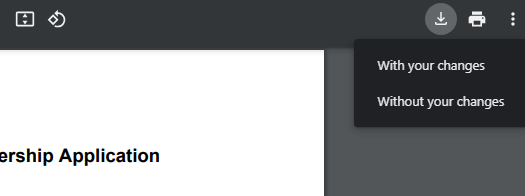
If you edit it online you can then use the download icon from the menu bar shown on the right , choosing 'with your changes' from the image on the right. This will then download it to your computer.
You then need to email it to the membership secretary as on the form
Note you cannot email the form directly from this website
Notes on completing the application form
You can either fill in the answers on your computer, or you can print out this document and fill it in the traditional way. It helps us avoid misreading your answers if you can use your computer.
If you are having difficulties with viewing or editing the form
- If you are able to view the form on your computer but unable to type your information into the form you probably need to use a different software application.
- Adobe Acrobat Reader is available for Mac and Windows computers. If you download the form to your computer and then open the form using Acrobat Reader you should be able to complete the form and save the filled form as a new PDF document.
- The Google Chrome web browser also lets you fill in PDF forms so try using Chrome instead of your usual web browser. When using Chrome, you can save the completed form by choosing Print and then setting the print Destination to "Save as PDF".
- It is not necessary to fill in the form on your computer. You can just print out the form and complete it by hand. If you do so, please write clearly, taking particular care that your email address is legible.
- If you are having difficulty filling in the highlighted check boxes on an Android or IOS phone or tablet you will need to download and install the free Acrobat Reader app from: https://adobeacrobat.app.link/Mhhs4GmNsxb This is the only app that will work on a tablet
If you are unable to print the form, please contact us and we will get a printed form to you.
Any problems contact the membership secretary at Membership